20 Common SEO Mistakes That Can Hurt Your Website
Learn about 20 common SEO mistakes that can reduce visibility, damage user experience, and limit website growth, along with practical ways to avoid them.
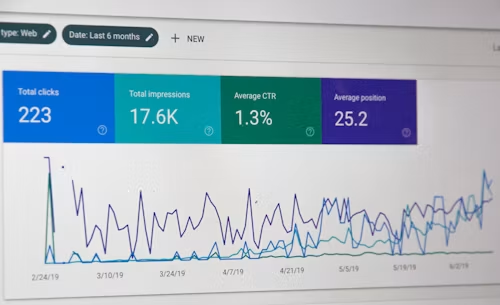
Search engine optimization can help your website attract qualified visitors, but common mistakes may reduce visibility and create a poor experience for users. Some problems affect technical performance, while others involve content, links, mobile usability, or inaccurate business information.
Here are 20 SEO mistakes to avoid if you want to build a reliable, useful, and search-friendly website.
1. Ignoring Search Intent
Content should match what people want when they search. A tutorial, comparison, product page, and local service page each serve different needs, so choose a format that answers the purpose behind the query.
2. Keyword Stuffing
Repeating the same keyword unnaturally makes content difficult to read and can reduce trust. Use relevant terms naturally while focusing on clear explanations and helpful information.
3. Publishing Thin Content
Short content is not automatically bad, but pages that provide little useful information are unlikely to satisfy visitors. Add practical details, examples, context, and answers that make the page valuable.
4. Copying or Duplicating Content
Duplicate content can make it harder for search engines to determine which page to show. Create original content, combine overlapping pages where appropriate, and use canonicalization when needed.
5. Using Unclear Page Titles
Page titles should accurately describe the page and help users understand what to expect. Avoid vague titles, excessive keyword repetition, and titles that promise something the page does not deliver.
6. Neglecting Meta Descriptions
A useful meta description can explain the value of a page and encourage relevant clicks. Write a clear, accurate summary rather than filling it with unrelated keywords.
7. Creating Poor Website Navigation
Visitors and search engines need to find important pages easily. Use logical menus, descriptive labels, breadcrumbs where useful, and links between related pages.
8. Ignoring Internal Links
Internal links help visitors discover more useful information and clarify relationships between pages. Link related content with descriptive anchor text instead of relying only on generic phrases.
9. Having Broken Links
Broken links create frustration and can make a website appear neglected. Check important internal and external links regularly, update them when needed, and redirect removed pages appropriately.
10. Overlooking Mobile Usability
Many visitors browse on mobile devices. Make sure text is readable, buttons are easy to tap, menus work correctly, and forms can be completed without unnecessary difficulty.
11. Having Slow Pages
Slow pages can lead to visitors leaving before the content loads. Optimize images, reduce unnecessary scripts, improve hosting resources, and monitor loading and interaction performance.
12. Blocking Important Pages from Crawling
Incorrect robots instructions, noindex settings, or access restrictions can prevent search engines from discovering or indexing valuable content. Review these settings carefully before publishing changes.
13. Forgetting XML Sitemaps
An accurate XML sitemap can help search engines discover important URLs. Keep it current and avoid including pages that should not be indexed.
14. Using Incorrect Structured Data
Structured data should accurately describe visible page content. Do not add misleading or unsupported markup, because inaccurate information can reduce trust and prevent enhanced search features.
15. Neglecting Image Optimization
Large images can slow down pages, while missing alternative text can reduce accessibility. Compress images, choose suitable formats, use descriptive file names, and add helpful alt text when appropriate.
16. Buying Low-Quality Backlinks
Large numbers of artificial or irrelevant links do not create lasting authority. Focus on earning relevant links through useful content, genuine relationships, partnerships, and valuable resources.
17. Ignoring Local SEO
Local businesses should keep their name, address, phone number, hours, services, and categories accurate across relevant listings. Encourage genuine reviews and describe only the areas the business actually serves.
18. Leaving Content Outdated
Old prices, expired instructions, incorrect statistics, and outdated business details can damage trust. Review important pages regularly and update them when information changes.
19. Failing to Track Conversions
Traffic and rankings do not show the full business impact of SEO. Track meaningful actions such as enquiries, calls, bookings, sign-ups, leads, and sales where relevant.
20. Expecting Instant Results
SEO usually requires consistent work, testing, and improvement. Give quality content and technical changes enough time to show results while continuing to monitor performance and user behaviour.
SEO Checklist for Avoiding Mistakes
- Match every important page to a clear search intent.
- Write for people and use keywords naturally.
- Keep content original, useful, and up to date.
- Improve navigation, internal links, and mobile usability.
- Check speed, crawlability, indexing, sitemaps, and redirects.
- Optimize images and use accurate structured data.
- Earn relevant links instead of buying low-quality ones.
- Keep local business information consistent.
- Measure actions that support business goals.
- Review and improve your SEO strategy regularly.
Final Thoughts
Avoiding common SEO mistakes can improve both search visibility and the experience you provide to visitors. Focus on useful content, sound technical foundations, accurate information, mobile usability, trustworthy promotion, and meaningful measurement. A steady, user-first approach is more sustainable than shortcuts designed only to manipulate rankings.